Funnels
Funnels allow you to visualise and measure how many users complete a specific series of steps on your website. This is essential for understanding conversion rates and identifying where users drop off in key processes like sign-ups, checkouts, or onboarding flows.
Overview
A funnel consists of a sequence of steps (pageviews or custom events) that you expect users to follow. Swetrix tracks the number of unique visitors who complete each step and calculates the conversion rate between them.
The Funnels dashboard provides a list of all your active funnels. Clicking on a funnel opens detailed analytics for that specific flow.
Creating a Funnel
To create a new funnel:
- Navigate to the Funnels tab in your project dashboard.
- Click the New Funnel button (or the large card with a plus icon).
- Name: Give your funnel a descriptive name (e.g., "Checkout Flow").
- Steps: Add the steps you want to track in order.
- A step can be a Page Path (e.g.,
/pricing) or a Custom Event name (e.g.,signup_button_clicked). - You can add multiple steps to define the exact journey.
- A step can be a Page Path (e.g.,
- Click Create funnel to save.

Analyzing a Funnel
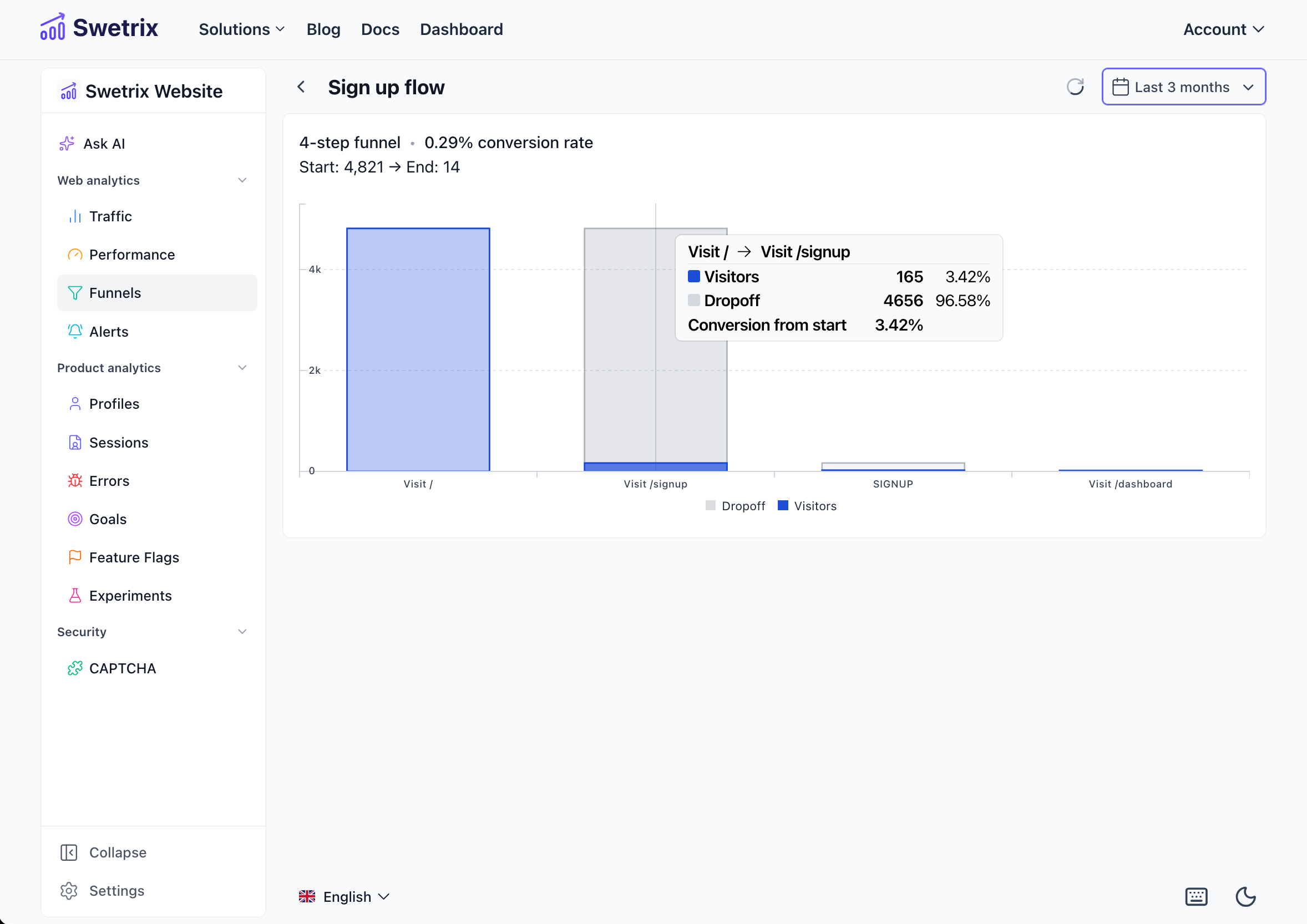
When you view a specific funnel, you'll see a visualization of the user journey along with key performance metrics.
Summary Metrics
At the top of the funnel view, you will find a summary:
- Steps: The total number of steps in the funnel.
- Conversion Rate: The percentage of users who started the funnel and successfully reached the final step.
- Start Visitors: The number of unique visitors who entered the funnel (completed the first step).
- End Visitors: The number of unique visitors who completed the entire funnel.
Funnel Chart
The chart visualizes the flow of users through each step:
- Visitors: The green bar shows the number of users who successfully reached this step.
- Dropoff: The red bar indicates the number of users who left the funnel at this step (did not proceed to the next one).
This visualization helps you instantly spot the "leaky" parts of your flow where you are losing the most users.
Managing Funnels
You can manage your funnels directly from the main list:
- Edit: Click the Settings (gear) icon on a funnel card to change its name or modify the steps.
- Delete: Click the Delete (trash bin) icon to remove the funnel permanently.
Only project owners and administrators (managers) can create, edit, or delete funnels. View-only members can view the funnel data but cannot make changes.

Help us improve Swetrix
Was this page helpful to you?